I´m new with SGP. I use MGEN2 for guiding. In SGP Control Panel i have selected “No Auto Guider” but the sequence will always canceld with reference PHD is required to run sequence. Don´t know what to do else after 2 days of search and trials. Nice program but I don´t want to be forced using something else as MGEN2
Hi there, We certainly don’t force anyone to use certain gear or programs. Unfortunately SGPro’s configuration can sometimes, by necessity, be complex. Because of this, it’s best to discuss issues using logs and sequence files. Assuming you are not on a trial, you can submit logs via the Help menu, Report an Issue. If you are on a trial, you can just attack the sequence file to this thread.
Hi Ken, I´m on trial.
Target 1.sgf (36.2 KB)
regards Rainer
Ok… well. I am not sure. I opened the sequence you attached and ran it with no issues and no prompt for a guider. Can you provide a screenshot of the PHD error to which you are referring?
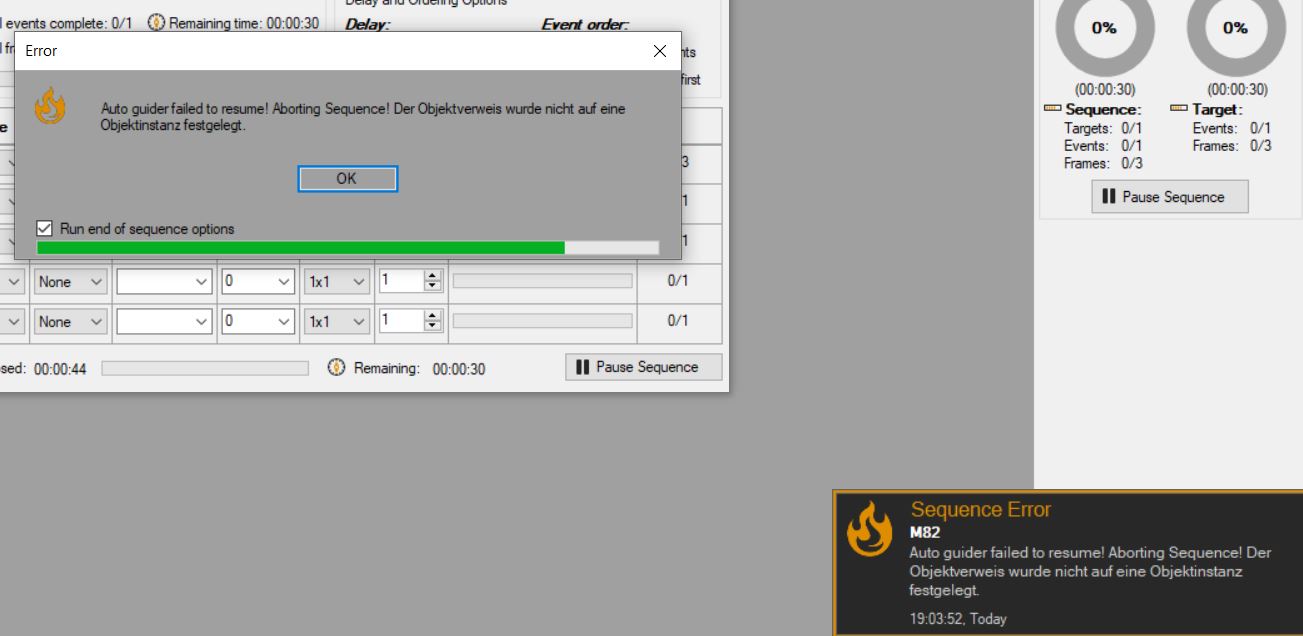
I am still not sure. I downloaded and the new sequence file you attached and ran it with no issue. If you are able to post the logs in a public file share or email them support@mainsequencesoftware.com we can take a look and find out for sure what we are doing different.
I have sent an email to support@mainsequencesoftware.com with the log. If you don’t have problems but I have problems with the same sequence file, it sounds to me that our SGP setups are something different. Am I correct in assuming that if I select “no autoguider” all other settings elsewhere will be overwritten? Anything else makes no sense to me and would be very confusing.
Unfortunately, we didn’t receive any email from you. Because of the cost involved, we generally disallow attaching log files to forum posts, but, in this case, please feel free to rename the logfile such that it has a different file extension (e.g. sg_logfile_1234565678.notalog) and attach it here.
Can you please answer my question if I´m correct in assuming that if I select “no autoguider” all other settings elsewhere will be overwritten? Please are so kind and tell me the steps I have to performe in SGP to be able to use my stand allone MGEN2. I sent the Email just again to support@mainsequencesoftware.com
Sorry, I don’t understand this question. What do you mean by “all other settings elsewhere”? Do you mean that if you have selected an option to dither, but have selected “No Auto Guider” that the option to dither would be ignored?
If that’s your question, the settings are never ignored. SGPro has no way to determine user intent in this scenario. We have no idea if you want to ignore the auto guider or if you want to dither, but have not selected an auto guider. If the sequence actions you request are in conflict with the gear and software you make available to SGPro, it will always generate an error.
That is the correct email address, but we have no emails from you (nothing in the spam folder either)
Ok, sorry that my question is so missunderstandable.
When I select “No Autoguider” it means to me that SGP is running a sequence without an autoguider. That’s exactly what I want to do. I don’t want dithering or anything else related to an autoguider. And SGP has been doing this for 3 days, keeps generating the same error message and aborting the sequence because SGP is requesting an autoguider, even though I have specified that there is no autoguider in my hardware profile for SGP to control.
I want to ignore the auto guider.
It’s weird with the email, I received your email in spam and replied to it
Yes, this is what I was answering. You cannot both ask for the sequence to perform guiding activities and then also provide no guider. SGPro has no way to determine which behavior is intended. In any case, neither of the sequences you provided seem to have this as an issue. In both it seems that you have no guiding activities selected, which is correct if you want to ignore the guider.
I am not sure what you mean here. I have not sent you any emails, we have only been discussing on this forum thread.
Feel free to use the method I outlined above to “trick” the forum into letting you attach logs.
That is an unmonitored email address and that email is sent to you automatically by the forum we use. Replying to it will simply create another forum post, but in this case it’s not because forum log attachments are not allowed. I indicated above that you should send logs to the support@mainsequencesoftware.com
I sent to support@mainsequencesoftware.com as well. Doesn´t matter. I have just installed 3.2.0.660 and it looks that this version is doing what I´m looking for.
Ok. Keep in mind that version 3 will no longer be updated and you won’t have access to many of the new features and fixes in SGPro 4. You can use it for as long as you like, but if there is an issue in SGPro 4, we should fix it.