I know that there is a trial time, I have a ZWO 2600MC, Leo Focuser, GSO RC 8 and MX+ mount. Is this still a good program to use for automated runs during the night using no filter wheel or any other equipment such as boltwood Cloud II. I want something that is simple. I have been having trouble using Nina 3.2 with this camera, downloads fail when a image is done. The trial time will confirm this won’t happen with SGP, Sky X works fine.
Some of my requirements:
can I set a time to start a run, ideally when sun is -18 degrees
When the moonrises, the run will shut down
When a object reaches a altitude in the sky to wait.
(this is only needed is the object before fails)
I have been given a reference from a friend but he uses 2600MM
I have discord, is there a channel?
Thanks, I am a advance user of astro software in general.
Certainly SGPro is a good choice for your needs, but I do have to note that if NINA is having trouble with image download and you are using the ASCOM driver for the ZWO then it is likely that SGPro will also have this same issue.
Sure. Every target can have independent start times. You can also specify a start altitude if you prefer.
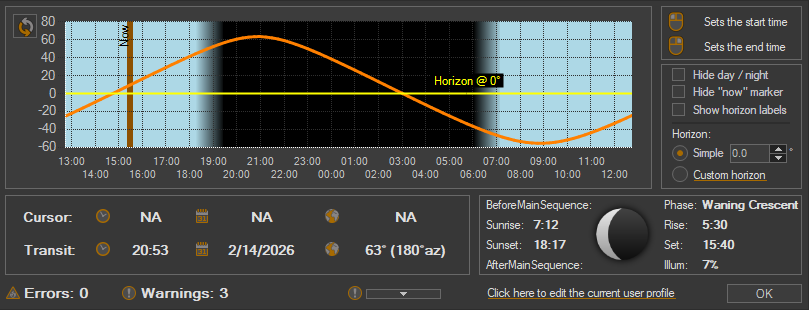
This is coming soon. The best SGPro has right now is in-app tools that tell you when moonset will occur. On this same dashboard where we display moonset data you can simply find the corresponding time on the graph and mark it as the end time. This will be automated soon.
I do not need to set a time to cool the camera so I leave this at 0. The tips say this sets the camera temperature. When I click the cool button cooling does start but not all the way. it appears that the time to cool does has to be entered. Ok, I did and it worked. I set to -10 then changed to -15. After clicking Set and the cooling button, the temperature window displayed warming. How to I check the set temperature again to cooler number and cool to new temp set?
What I do is connect the camera, which seems only possible with a sequence, Then turn cooler on while doing other things before dark. Being new to SGP Pro I have not found a simple way to just take a 5 second exposure. Does it have to be a sequence, I am not moving a telescope or need the guider. Does the user guide cover all these details or ionly general how to use SQP
I am taking 60 3 min images to see if the download fail will happen. I have enough proof that it is a NINA issue. I plan to use SGP to start a run and log off my PC in Colorado. Been at Astro P for 55 years. So far I like what I see. It would be nice if when I open the control panel window where there is only one profile listed, that would be selected and loaded. I am buying SQP even if it doesn’t work out, I was developer and always support developers thanks
You can use Frame and Focus for this. It is designed to loop the camera without saving data to disk.
This is optional and, if you’d like, you can designate your one and only profile as the default. After this, going forward, anytime a new sequence is created it will use your (one and only) profile to do so. You can identify a profile as the default in the Equipment Profile Manager.