Below is the calc… I entered a FL? with field flattener? It’s a 480 FL with 0.8 making it a 384FL. (so I enter that yes?)
The calc doesn’t give scale? It gives pixels size of 2.05? But the specs
for the ASI071MC camera say pixel size is 4.78m ???

What software is that?
To calculate image scale is very simple: (206.3 * pixel size in uM) / focal length of scope
In your case: (206.3 * 4.78) / 384 = 2.57 "/pixel.
Peter
thanks - then there are gain value and e/ADU questions? for binning.
(Being a retired pro photographer - “portrait” I have no idea what binning is. (Maybe a compression format for lossless smaller files?) I’d shoot RAW but nothing was binned… 1x1? 2x2? 4x4? doh?
I’m pretty sure that the calculator has given the wrong name to the image scale. I used the following calculator to calculate the image scale for your camera and SV80S.
http://celestialwonders.com/tools/imageScaleCalc.html
It calculated a scale of 2.05 "/pixel for the 480 mm SV80S. The same calculator calculated 2.57 "/pixel for the 384 mm focal length with flattener. It appears that the calculator you were using did not use the manually entered focal length (384mm) but allowed your selection of the Stellarvue SV80S to override the manual entry. Also item listed as Pixel Size by the calculator you used is really the image scale.
Fred
No wonder it was confusing me!
https://starizona.com/acb/ccd/calc_pixel.aspx
pixel res and field of view calc.
On a step toward progress, I am aiming the scope out at some tree’s. I could enter a exposure of 0.005 and shoot daylight (happy!) though 1/250th would be easier for me. I see the HFR popped up in gaps in the trees it thinks are stars. Now my question is - it looks like (I zoom in) and I’m seeing the screen door effect (binning)? how do I turn that off or shoot RGB color with my color cam? Another issue - in trying to use the trees as test area and trying to test/learn the sequencer… I enter data and it refuses because I have no plate solver setup. (if I did it wouldn’t solve the tree gaps) any way around that? It’s an AMAZING program - but so far seems to be … restrictive? at least for the noob. I just wanna automate some shots of the trees out front to learn the program.
I assume what you are seeing when you zoom in is the Bayer matrix. An image from an Astronomical OSC camera needs to be De-bayered to reveal color. With a regular DSLR this is done in the camera unless the images are saved in RAW format. SGP does not De-bayer the image so you need move it to processing software to reveal the color. I believe there are some free FITS file viewers which can Debayer your terrestrial test images.
I think if you uncheck the “slew to” and “center object” options the plate solver will not be called. I have done very little testing of SGP inside the house except to verify hardware connection and plate solving. The real magic occurs under the stars. You can test your plate solver by downloading images from DSS. You then load the image into SGP. You then right click the image and select solve to test your plate solver setup. You will need to manually enter the image scale of the DSS image or the solver will fail unless you are using the blind solve option.
When I first setup SGP I introduced the various features one at a time to simplify trouble shooting. If you try to setup and use all the features the first time it can be very frustrating until you have some experience. You are already part way there because your camera is connected and you are able to take and download images.
I believe you should be able to do what your trying to do by setting up a sequence with the “slew to” and “center options” unchecked. Point the scope to the terrestrial object and then specify the number and duration of images, and run the sequence. If the sequence will not run, it will tell you why it could not run. You don’t want to specify any hardware other than your camera. For example: Guider, Focuser, Plate solver etc.
I’m sure that there are others on the forum that can provide many other suggestions on how to do initial testing of your setup inside the house.
Fred
Ron,
Binning combines individual pixels to make a larger pixel. For example 2x2 binning uses a 2 pixel by 2 pixel area to make a single pixel with 4 times the area of a single pixel. Likewise 3x3 has 9 times the area of a single pixel. You normally don’t want to Bin a One Shot Color, OSC, camera because the data cannot be Debayered to reveal the color. I will Bin my OSC camera for the Plate Solving and Auto Focus operations to increase the sensor sensitivity but all of my astro-images are shot with 1x1 binning. I’m not sure what your question is about gain and e/ADU.
Fred
Thanks Fred. so I’m forced to save bayered images? SharpCap has 8 and 16 bit bayered options - but then RGB which saves a really nice normal color image. No way to do that in SGP?
Actually my setup is in the garage. Laptop n all. (the wife kicked me out since it was in the kitchen a couple weeks). so I’m running the setup via Team Viewer in the kitchen desk area computer - which is controller the scope setup in the garage. I’ll uncheck those things next test later today after the yardwork. yes I’d like to break out of the regiment by eliminating the things I don’t have setup yet.
So there is a option to not shoot bin? so I can see the one shot color i just recorded?
Is 1x1 = no binning? I thought I was on 1x1 but will check.
great - but I need to ask - where did the 206.3 come from?
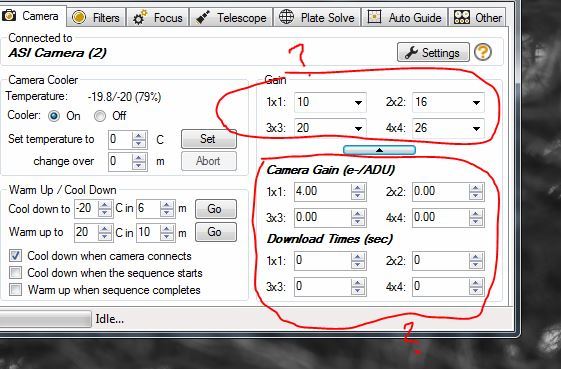
When using sharpcap I can set my gain. (or use auto) and this lets me increase it for faster fps like when focusing. I want a update every second… so upping the gain will let me get a faster exposure. Later I want the gain lower for my capture. I don’t see a gain setting per se in SGP? I do see under camera settings. “gain” and appears to want a gain setting for each bin level? 1x1 2x2 3x3 and 4x4? I Still have no idea why people want to bin? What is the benifet? I read it saves multiple pixels as one? (for smaller downloads?) I’m lost no that one. How does gain relate to bin?
Binning is an exchange of resolution for (linearly increased) signal sensitivity. Typically, as you increase sensitivity, you will want to decrease gain.
Searching all over - I seem to have seen these before, but I can’t locate them now?
Ron,
The specific setting for your camera are accessed by clicking the Setting button to the right of the camera name in the above dialog. Whether or not you can specify the gain will depend on what features ASI implemented in the ASCOM driver.
Binning increases the sensitivity of the sensor; thus shortening exposure time. This is done at the expense of resolution. It used to be common for imagers using Mono cameras to bin the RGB data while shooting the L at 1x1. I am not familiar with all the “whys” and “wherefores”, but if I think that fewer people are binning with the more modern cameras; especially those with CMOS sensors.
Fred
206.3 is a conversion factor of radians to arc seconds (57.3 degrees/radian * 3600 arcseconds/degree = 206265) divided by 1000 (because we measure focal lengths in mm and pixel size in microns).
Peter
AH I never noticed image type there before. I have no idea what offset is. For image type it gives me raw8 raw16 and Y8 ???
Then it says Bayer pattern RGGB - and a box to check monobin? Then pre-defined gain settings? Again I dunno what each is.
Ron,
You should make another post which specifically asks about the best settings for your camera. I am sure someone else on the forum has probably used the same camera. I do not use a camera like yours, so I don’t know what specific setting are best.
Fred
Ron,
I found this post in the CloudyNights forum that should be helpful in explaining what the various terms mean for your camera.
https://www.cloudynights.com/topic/570592-zwo-asi071mc-cool-color-issues/
Fred
I changed my situation. I returned the OSC, and replaced it with a 1600MM-C. No more debayering issues. (well I just had solved that by using pixinsight - which properly debayered. Other tools didn’t) = ( but camera was already
sent back.
ANYWAY - I sometimes need to frame and focus with the narrowband filter. (I change to lum usually and change back) but sometimes I want to be sure and get proper focus with filter in use.
What do I enter in the above (original post in this thread) boxes, so that I can get temporary higher gain setting for shorter F&F exposures ?
OR - I’d like to request or ask if there is a feature in SGP that allows me to see the cameras gain just for F&F? 20 second exposures for narrow band F&F is a lot of wasted time.
Of course I like to capture at really low often 0 gain… but for F&F is’t a pain to go into camera settings and change the gain in the ascom driver. (disconnect camera, click settings, change gain, go back and reconnect camera and
expose for F&F - then go back agan disconnect camera, lower gain, close that and reconnect camera.
Not to mention I have to be present to do this and I can’t have automation I’d like with auto F&F during a segment. I THINK that binning is another way to boost sensitivity for shorter exposures for things like focus?