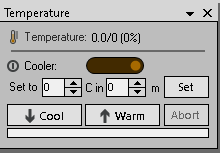
Just trying to remember which side of the switch is on for TEC control of a ZWO camera? The mouse over helpfully says the switch turns the TEC on/off - but not which direction is on?
I ponder my ASI 071MC-c has a new error - as it reports 0 ceclicus (its target temperature) but 0 power draw - and I expect in Sydney at 16 degrees it should be drawing 30% power.
I presume right it on - is that correct? Pondering if there is a simple test I can run to see if the temperature and power draw is correct - I am thinking I have a new problem to explore.
The camera is connected to a 12V lab power supply.
PS - the fan isn’t spinning and the powersupply is delivering 12V - so it could be this device that ZWO repaired the TEC on 13 months ago has failed yet again 