A simple question about manual positioning of the telescope
<Hi,
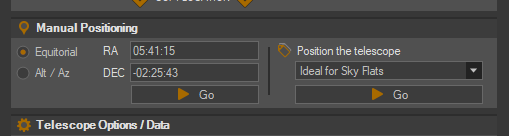
A simple question about manual positioning of the telescope from the Control Panel: What are the correct formats for values in the Equatorial RA and DEC fields? For RA it works fine with 05:41:15 etc. but how do I enter a negative value in the DEC field such as -02:25:43? The positive value 02:25:43 is accepted but if I put a minus sign in front I get an error message.
The set of coordinates are for IC 434 which I wanted to move the telescope to yesterday night.
I have search the help files for an instruction on the field formats as well as this forum, but unfortunately I have not found an answer, hence this question.
I am not sure off hand. There is nothing wrong with the formatting you noted above. When I enter that exact DEC value into the CP, there are no issues. Can you detail what error you see?
Hi Ken,
Thanks for your answer. Now that I know the correct format I will experiment a bit. You may absolutely be correct about the national keyboard beeing an issue. You may remember that I ran into a similar problem some years ago where SGP and the Swedish Windows disagreed about the use of a comma and a period as the decimal separator. That particular quirk made it impossible for me to use Platesolve 2/3, but the problem was solved by using ASTAP instead.
If I find out anything similar about the minus sign I will report back.
All the best,
Rolf J, Huddinge
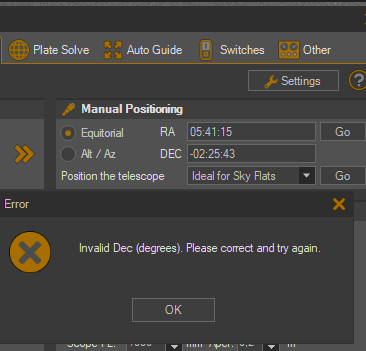
@Ken A short update on the positioning problem: I experimented with the Control Panel positioning but could not find a way to enter a negative DEC value. I only get the enclosed error message:
“Error: (Invalid Dec (degrees). Please correct and try again.”
This may very well be something related to my Swedish Windows 10 OS, so I suggest we leave it as is for now and let us see what happens in your next major release. I also have other ways of positioning the telescope, so this was a mere test of a way that would have been convenient if it had function for me.
I may be way out here, but if you can find the keyboard code used for what your trying to enter, you should be able to enter it as a control sequence: something like control key, followed by Letter, followed by the code (maybe in brackets or something). Use to do this in Turbo Pascal. Lots of stuff still works if your old enough to remember it ever existed, i.e., somethings very easy to do in command mode using old DOS system most don’t know exists or ever existed. CHATGpt might be able to tell you how, try in a text file?
Hope this helps;