I’ve been an SG Pro user now for many years, using it nightly, when clear, in the UK and in my remote setup in Spain. Firstly, I find issues nearly every time a big new release comes out.
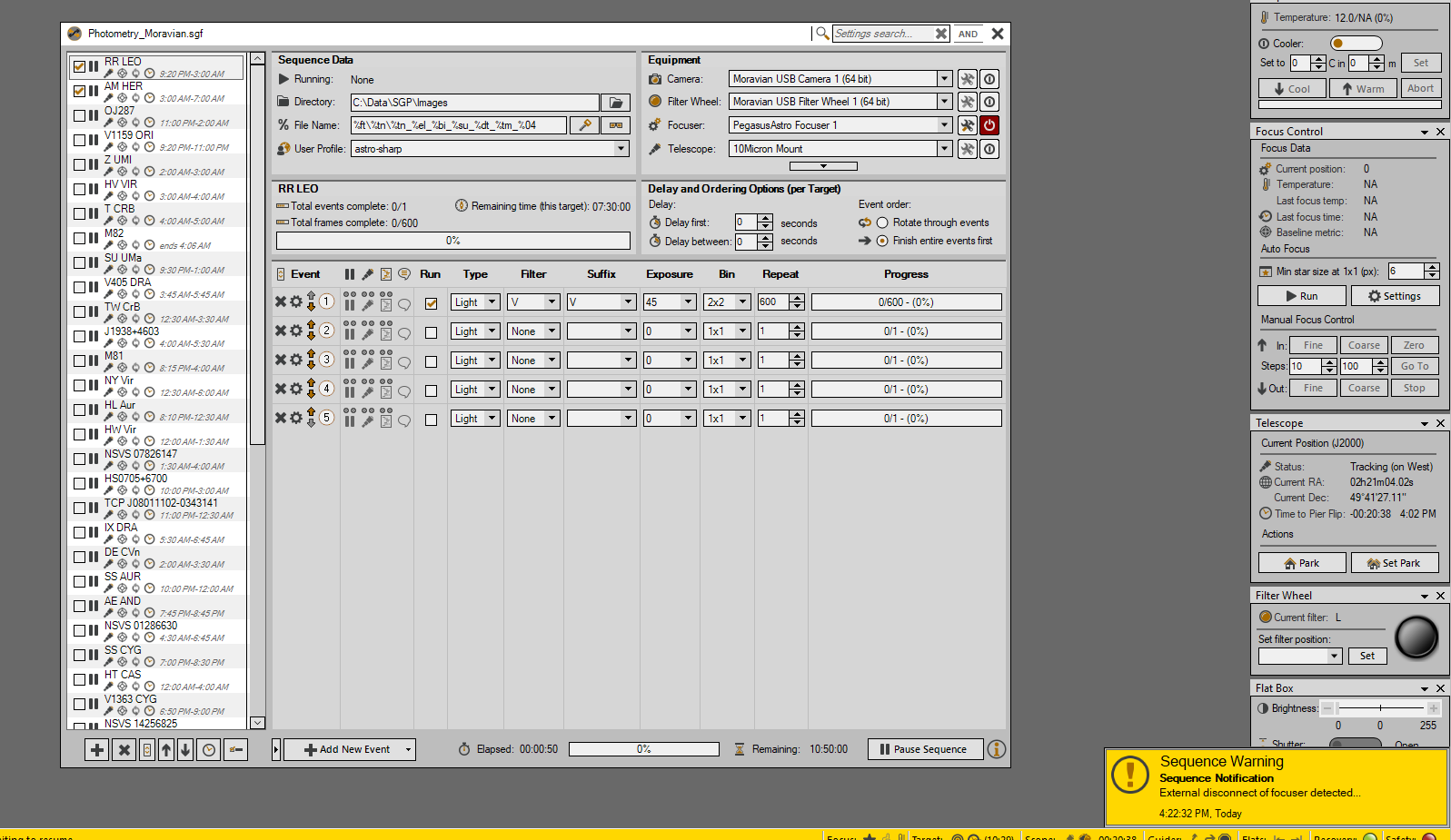
I had to uninstall the new Version 4.5.0.1624 after one night because it keeps reporting my Pegasus focuser has been externally disconnected when it has not. (No such problem with 4.4.1.1441)
It also puts up new warning messages about the safety monitor when I first start the schedule going saying that it will run end on sequence options if I don’t intervene. I start my schedule before dark so I know it is not yet safe! This has never happened with any of the dozens of previous versions I have used.
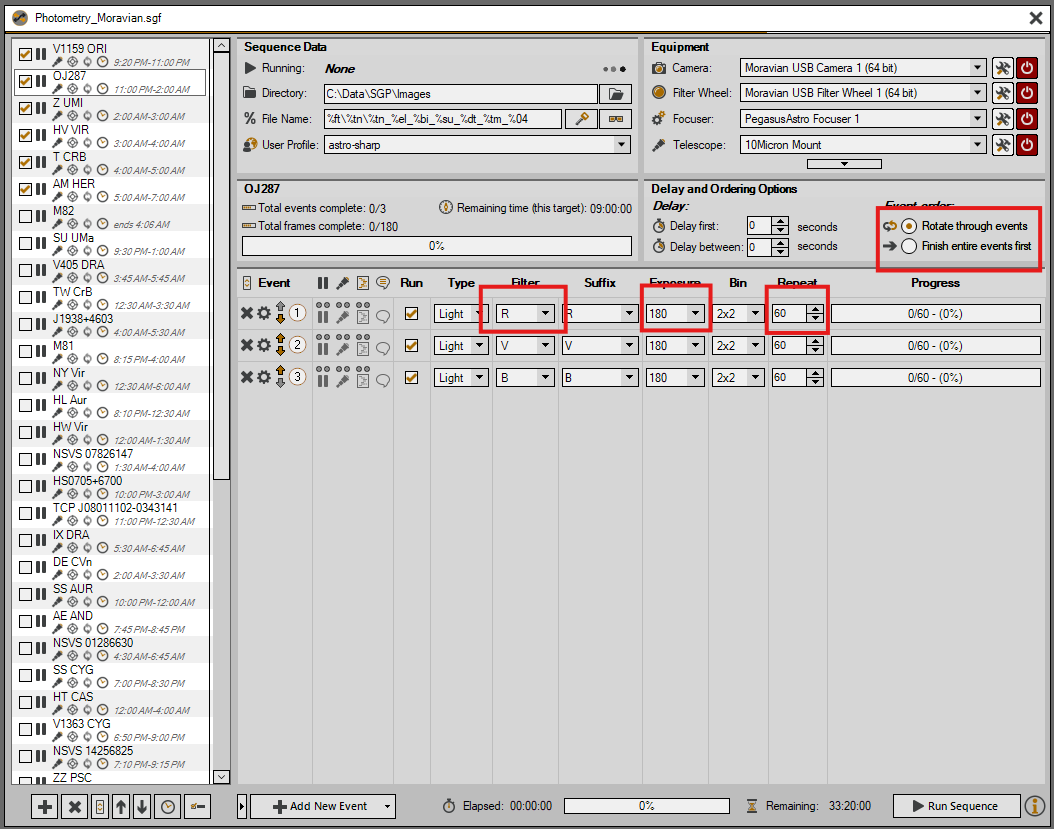
Lastly, there is a bug where SG Pro ‘forgets’ settings in my targets! This happens randomly and regularly! I am very paranoid now had have to check all target settings before I start the night. For example, it will lose the ‘Rotate through events’ setting. Sometimes it forgets the selected filter or exposure. Very frustrating!
This isn’t a bug, but I agree it can be handled better. I’ll need to think about it for a minute… trying to satisfy two camps here (yours: start sequence while unsafe and the other: please protect my gear if the weather turns, even if a sequence is not running)
Not sure how to interpret this. Do you have any additional detail?
Thanks for your reply. I can see you have released a new version which addresses the safety monitor issue - I will give this a try.
With regards to the ‘forgetting of settings’ issue. I typically work with sequences containing 50+ targets because my primary work is variable star photometry and I regularly shoot lots of targets in a night. I find that SGP regularly corrupts some of the target settings including those highlighted in the attached screen shot. I have no clue as to why this, randomly, happens. I might go a month in-between occurrences. I think that it happens more to targets that I have not used for several months due to them going out-of-season.
I have a theory that it might happen when I re-order targets in my long list of them, which I regularly do to get my targets for the night at the top. I couldn’t swear on that though.
Ok, Thanks for the details here. I have some thoughts on a few of the four things you highlight here:
Event order: Not implying that this is for certain what you are seeing, but it’s worth noting that this setting is per-target (i.e. each target has its own ordering parameter). This is not the most intuitive setting (because it wasn’t always this way) and it can sometimes be confusing that switching targets causes this setting to also change.
Exposure: Only a semblance of an idea here… this field is unique in that SGPro only accepts exposure length in seconds. But… the field allows user to specify exposure length using several different formats (e.g. 5m, etc). I wonder if one of the actions that are part of your normal workflows somehow trigger this in an undesirable way. When this field changes on you do you recall how exactly it does so?
Filter: Unless you change filter wheels or somehow open an existing sequence into a new sequence (import) that does not have a filter wheel set, this field should be pretty reliable. You’re not off-base in your theory though about moving targets though. Can you tell me how you move them? Right-click context menu? Drag and drop reordering? A mixture?
Also, if you were inclined to share one of your sequences with me, I can use it to fiddle around and try to re-create what you see.
I move them normally by using the up/down arrow buttons. Also, when I add a new target, or when the target is some way from the top I use the ‘Move to Top’ on the context menu and then order using the arrows after it hits the top.
With regard to exposure I always type in seconds (60, 120, 180, 300 etc).
I’ll get back to you with one of my sequences - how should I send it to you?
Just to say I’ve tried 4.5.0.1631 and I still get the sequence shut-down warning when I start the sequence before dark. I thought that behaviour had been changed back?
Additionally, I get an issue where my superb Pegasus Prodigy focuser gets disconnected with a warning (see attached screen shot). I can assure you that nothing is externally disconnecting the focuser and this warning does not occur with the older versions.
I’ve had to switch back to 4.4.1.1441 as the new version is still unusable for me.
I did not change it back to previous versions, what I did was alter it in a way that should be compatible with your workflow. In other words, if you start a sequence in an unsafe state (i.e. daylight in your case), the sequence will automatically enter the “restart on safe mode”. When the safety monitor reports safe, the sequence will start automatically.
A tiny FAQ:
What happens if I connect my Safety Monitor manually when the signal is UNSAFE?
SGPro will attempt to run End of Sequence actions but allow you to stop.
What happens if I my Safety Monitor is in a disconnected state with an UNSAFE signal and sequence start performs an auto-connect?
In this case, SGPro will NOT perform End of Sequence actions, but will enter Restart on Safe mode immediately.