I recently installed one of the beta versions (4.4.0.1538?) and a couple of things changed in how certain things are displayed. I’m sure there’s a button to push which I haven’t found, so I’m asking for a general lesson in SGP set-up.
When I have an image displayed I can display the crosshairs, but when I change to a different image (e.g. when I take another frame-and-focus photo) the crosshairs disappear and I need to click again to display them. I didn’t have to do that.
Is there a way to force Display HDR to refresh every time the photo is refreshed? Currently I have to display the HDR data, then “undisplay” the HDR data then take a new image, then display the HDR data.
Oh, one other thing, not related to display preferences: SGP no longer creates subfolders for flats or lights in either of the instances I have installed. All frames are saved in the folder I define in my sequence. Is there a way to “instruct” SGP to create subfolders for the various frame types? That is a useful feature.
No lessons here… this is a bug I just confirmed. The intent here is that an image “container tab” has certain options that are “sticky” and persist in the tab even when the image changes. Crosshairs is one of these and it is getting reset within the same tab when a new image occupies it. I’ll take a look here.
I’m not sure what you mean here. Can you expound?
There are no changes here in SGPro 4.5 and I just verified the “folder creating” for image paths is functional. I used this path for testing %ft\dir1\%tn_%el_%bi_%su_%04 so that both static and variable directories are used. What are you using?
Ken, about “refreshing” HFR: when I take a frame-and-focus shot I’ll sometimes right-click and select HFR so I can see a sample of the stars’ radii. If I then take another frame-and-focus shot the HFR values disappear, but I have to right-click and select HFR and then right-click and select HFR again to see the values for the new F-a-F frame. What I’ve started doing is take the F-a-F frame, right-click, HFR, right-click, “deselect” HFR, take another F-a-F and then repeat. It would be good if HFR recalculated its values when a new frame is “presented”.
As for creating subfolders: I figured that one out: operator error. I had my default path created properly, but when I created new sequences I didn’t modify the default path by selecting the sub-folder for the target in the sequence. Duh.
Question about this: if I include a sub-folder in the filename string, will SGP then put individual images in that sub-folder? For example, if my filename string is:
\%tn\%tn_%ft_%el
Would SGP create image files named: [default file path]\NGC4535\NGC4535_Light_180s for example?
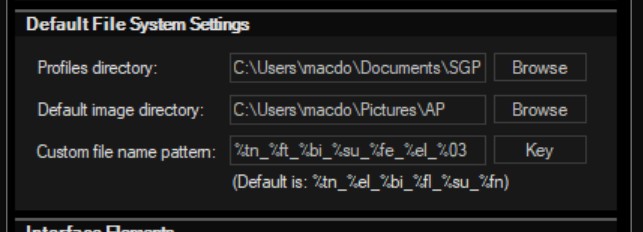
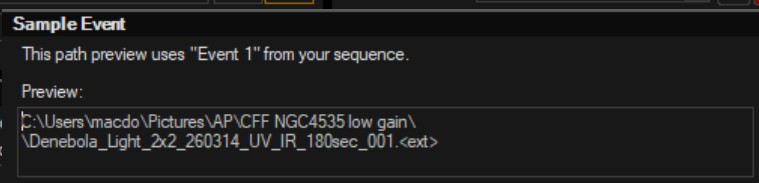
New question: I noticed my filenames have a weird double back-slash in them. This may have been occurring all along, but I just noticed it. I can’t figure out what’s causing it, or if it has any weird interactions with other programs, like Pix Insight. I’ve attached a couple of screen snips. The double back-slash is hard to see in the second snip: look between “…low gain\\Denebola…”
Understood. What you describe is the intended behavior… the star analysis state is also meant to be sticky and I’ll see if this is somehow also broken.
Correct. SGPro will use whatever folder structure you specify in the file name (path). If it does not exist, SGPro will create it.
A clarification here… Can you provide more detail on how CFF NGC4535 low gain\ becomes part of your file name? What is it? The screenshot above shows the root path at \Pictures\AP and your finale naming pattern does not seem to have any directories at all specified.
Typically, the presence of \\ in a file name would indicate some kind of missing value for one of the tokens (SGPro should always substitute missing vals with some text to indocate that is the case… I’m just not sure the source of that text.
With respect to the “sticky” image analysis, I see that flow you describe is indeed broken. I’ll take a look. In the meantime, if you use the star icon instead of the context menu, that works as expected.
Apologies for not responding for so long. We’ve had clouds for four weeks in a row and astronomy has not been part of my life for that long. In Preferences I have a default directory set up. When I create a new Sequence for a project, I’ll create a sub-folder for that object and then within SGP use the “folder” icon to select my project’s subfolder.
As for the weird double back-slash, it appears between the folder structure/ path and the filename. I use the filename “keys” to get SGP to name my files for me. So, when I preview my path (using the “glasses” icon) I see this: C:\Users\macdo\Pictures\AP\CFF Hoags Object\\filename.ext I don’t know what value would be missing.
I also saw your later note about the image analysis not being “sticky”. If the clouds ever clear, I’ll try using the star icon. I appreciate your looking into that.