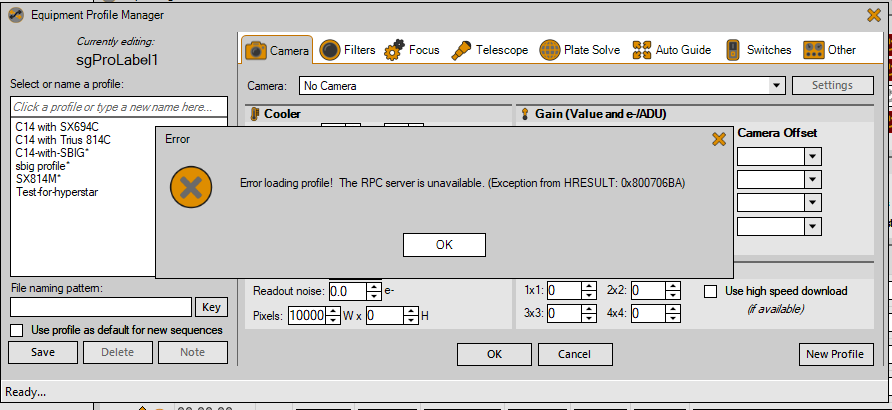
Hi, Just bought a OSC cam to replace my mono. So I went to try to get it set up in the EPM and I get this error:
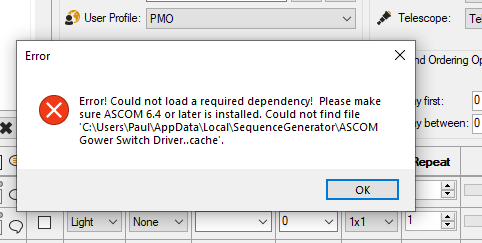
I have the latest version of ASCOM installed.
How can I escape this?
thanks
Paul
Hi, Just bought a OSC cam to replace my mono. So I went to try to get it set up in the EPM and I get this error:
I have the latest version of ASCOM installed.
How can I escape this?
thanks
Paul
This isn’t a problem with your machine, it’s almost certainly a bad profile state. Are you, by chance, using a machine for SGPro that is different from the one you used to create that profile? Ver 4.1 addresses this issue.
thanks Ken, the profile was exactly the same, I haven’t used SGP for about 7 weeks due to adverse weather/ observing conditons. However, downloading the latest beta has solved the problem - thanks for the suggestion.
Paul
something strange happening here. As I reported in my last post, the problem I posted went away when I installed the latest Beta. Today I have just launched SGP and attemped to enter the EPM and got the same error again.
However when I checked the SGP version, SGP reports it as below:
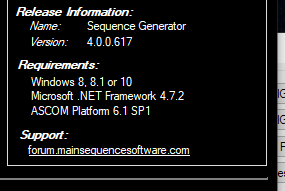
So I seem to have lost the latest Beta install somehow wnd reverted to my previous SGP install.
Or perhaps I now have two installs? I’ll check that, but I didn’t change anything in the installation dialog, so assumed the ‘old’ version of SGP would have been uninstalled when the new one was installed.
I’ll post back.
Paul
for some reason there are two installs. At least I know what the problem is.
So I can see the two versions in the Windows control Panel. Presumably I can go ahead and uninstall the previous version and keep the latest Beta?
Just to check I won’t cause problems by doing the uninstall?
thanks,
Paul
No, you can have or not have as many side-by-side installs as you want. You just need to take into account that they will all share the same settings and that one may alter a sequence or profile in a way that renders it incompatible with another version.
ah, great, thanks Ken, I only need the latest version so I’ll go ahead and uninstall the other.
Paul
[edit]
I got this error Ken, but it was dismissable and seems to let me use the EPM:
That is a COM error from an ASCOM driver… not sure which one, but it is typically caused by using 64-bit SGPro for drivers that only support 32-bit systems.
Be careful saving your profiles after an error like that. It could mean that the profile was not fully loading it and saving it will essentially reset all the settings that were not initialized properly.
ok thanks Ken, I have my profiles stored on another machine too, so I’ll copy them from that m/c, as I did make a change to the profile and save it before I saw your post. I’ll have to try to work out which ASCOM driver caused it.
thanks for help,
Paul
Ill add a note to that error message.
Hi Ken,
This problem has developed a bit and I don’t know how to address it. I hope you can help.
On the machine I use in my observatory (this is not the one which had the error described in these posts), I have 64bit windows, 32bit version 3. SGP. It all works fine. So I have purchased a new camera and today tried to install the the ASCOM driver for it. I selected the 32 bit driver option so as to be compatible with SGP. However, I received an error message from the installer which indicated i ‘must use the 64 bit version on this machine’.
I didn’t go any further with the installation. Will a 64 bit camera driver work with my 32bit SGP?
I think I’m going to have to do some reading to get a better understanding of this bitness compatibility stuff.
thanks for help.
Paul
No. The bit-ness of application and driver must always be the same. I think the confusion comes from being able to use a 32-bit application on a 64-bit operating system, but applications that communicate like SGPro does with ASCOM must always be the same.
You have a 64-bit operating system so you can run either version of SGPro. That said, the only valid reason to not run 64-bit SGPro is if you have drivers or other software that don’t support it. What is the new camera?
It’s a Starlight Xpress Trius 814C. the Starlight express installer offers two folders, one called 64bit and the other 32bit. I chose the 32bit folder and ran the installer from in there. That’s when I got the error ‘must use the 64 bit version on this machine’.
Perhaps it’s best if I contact support at Starlight Xpress.
[edit] I have just revisited the SXPress support pages and noticed that the driver I downloaded, although correct, is not the ASCOM driver. So I have just found that and installed it with no problems. So I hope that will be fine when I use it with SGP. I’ll post back if any further issues.
thanks for your help Ken,
Paul